This is the 5th (and last, for now) piece in the DNS (in)visibility series. If you've missed the earlier parts, they're on the site. Part I, server-side logging, Part II, the client side, Part III, detections, Part IV, evading all of it.
In the last piece, on evading DNS telemetry, I said I wasn't the bearer of good news. But I closed on an optimistic note, that network monitoring is worth taking seriously as a second opinion, because EDR alone struggles to reliably catch a lot of offensive activity. DNS techniques such as beaconing, tunnels, exfiltration, spoofing and poisoning, and reconnaissance are the obvious examples.
In this post I want to show some basic investigative work on real network signal, and how easily DNS misbehavior shows up when you run the capture through our analyzer.
The evidence I chose to analyze here was first presented at the 2025 European Cyber Week as a forensic CTF qualification challenge called "Alice_In_Rans0ml4nd", credit due to the author 0xInsomnia / D3XTER (here is his own write-up). The investigator was not provided with preliminary clues nor an elaborated back-story, just "Alice-Corp's network has been encrypted by ransomware... analyze the captured network traffic (PCAP) to identify attack vectors, malware IOCs" (and obviously find the flag, it's a CTF after all). Here's the download link. 1_C0ns3nt_;) is the password for the zip. Disclaimer: While downloading the zip-protected pcap file and uploading it to our analysis service cannot harm you, I'd advise to use isolated/investigative environment to anyone who would find this interesting enough to investigate manually.
Look Ma, no hands!
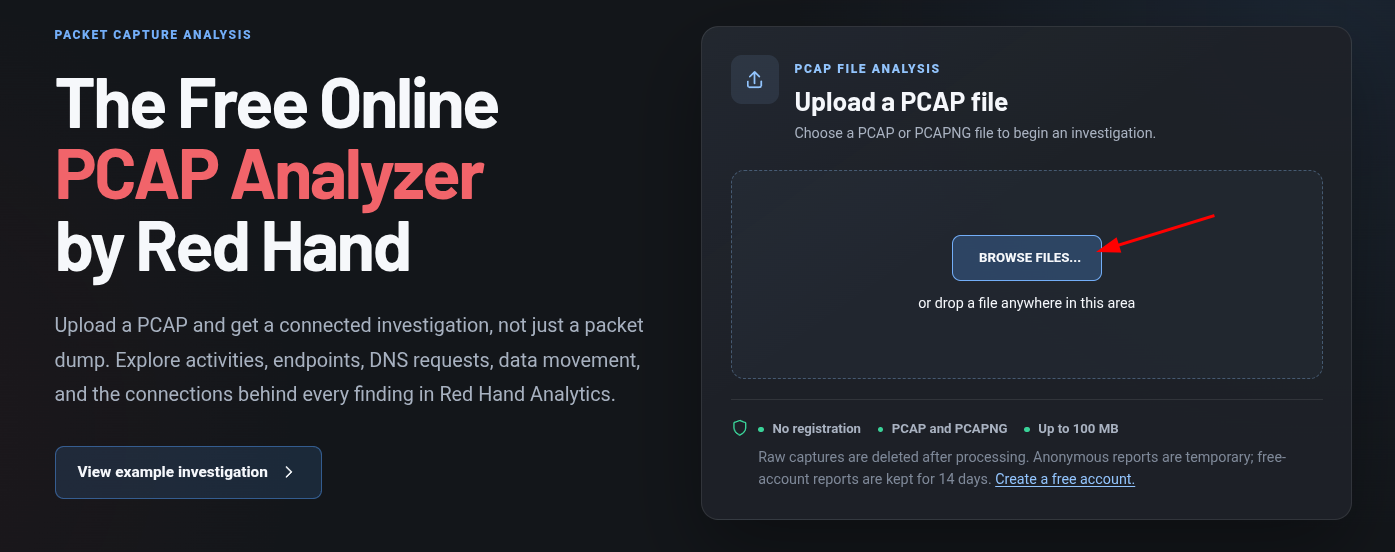
For those who were not aware of our online analysis service here 😱 - hit the browse files button and choose the pcap file.
When analysis is done (generally it shouldn't take too long, but if others are queueing up, you can leave your mail to get notified when ready), click the 'View Report'. The first screen has a high-level summary of what's inside, in our case 40 detected activities, 24 distinct endpoints, 469 connections and 4MB of data (yes, this pcap has practically no noise).
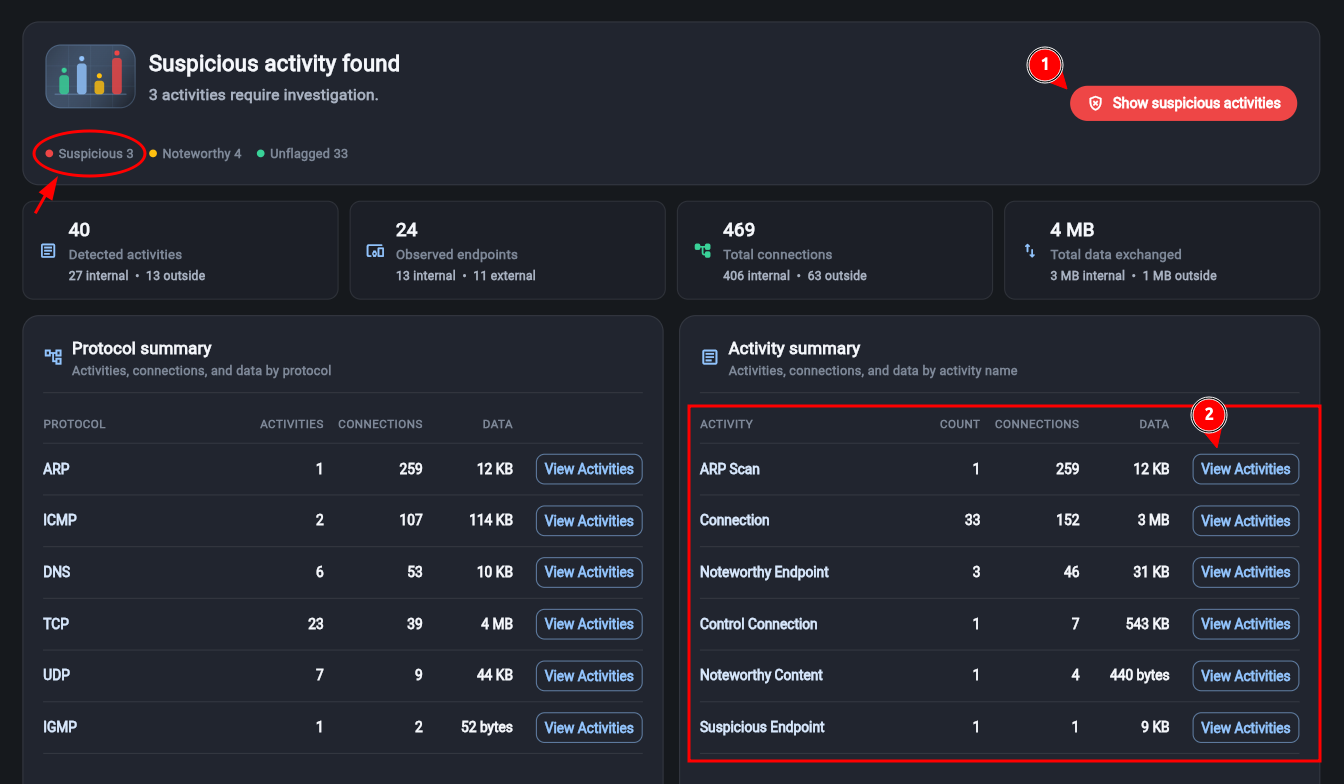
The most obvious thing to first check would be the 'Show suspicious activities' [#1 in image].
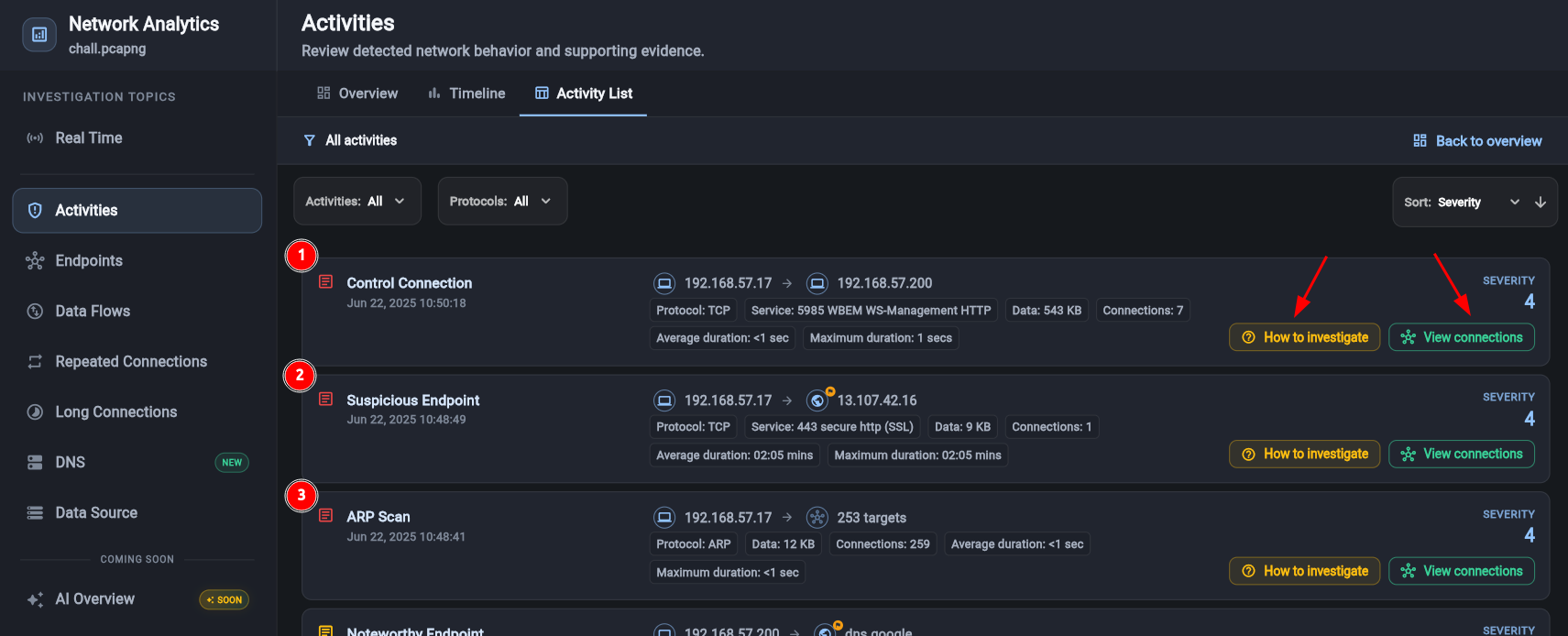
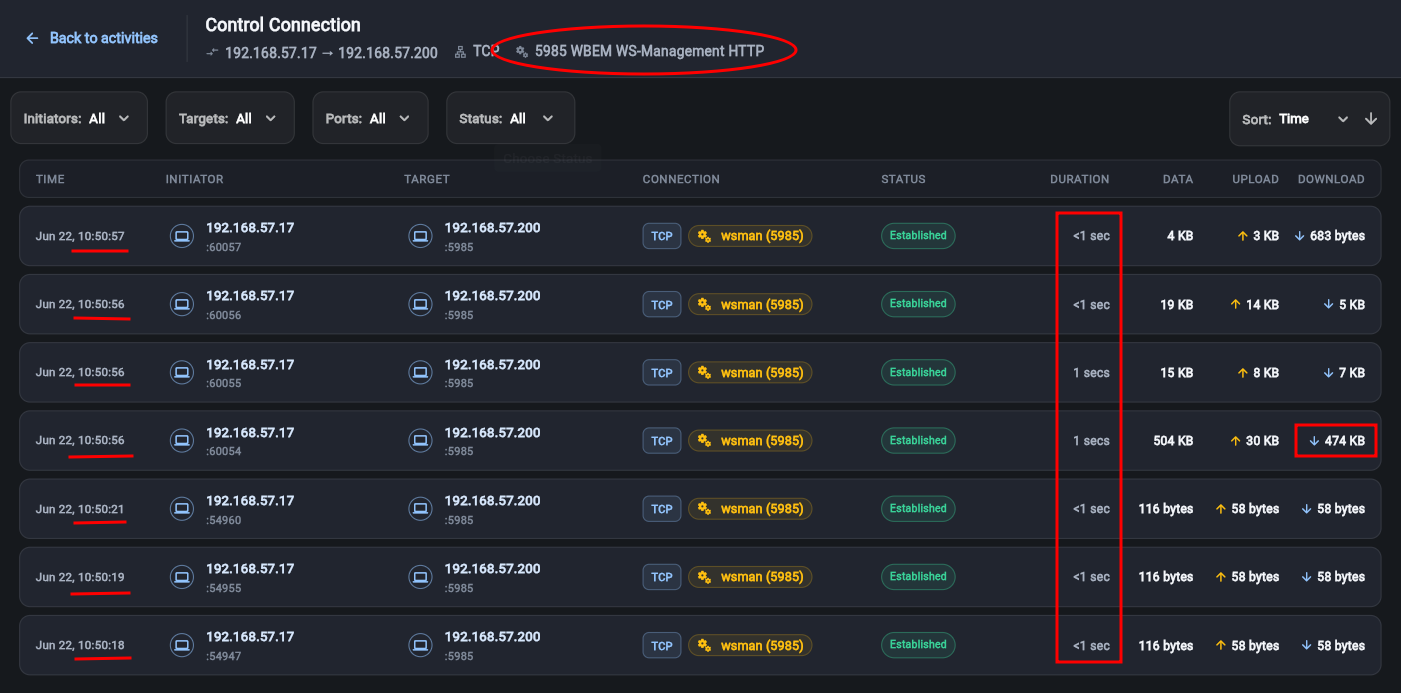
This sample pcap, although quite small, has quite a lot of different activities in it, but this post is not about how to investigate it, but rather on how to use the analysis service to effortlessly expose stuff that could otherwise be quite hard to notice. So just in the order of appearance - the report surfaces all obvious control connections (whether friendly or not), just because it recognizes most remote management applications/protocols. In this case notice the first finding - the WinRM (Service 5985 WBEM WS-Management over HTTP) between 192.168.57.17 (source) and 192.168.57.200 (target) - and more precisely 7 connections of it holding 543KB of data. To get a more detailed view of each connection press on the 'View Connections' button - there you'll see that all 7 connections happened within the same minute, each lasting a second or less, and one of them moved ~500KB, almost all of it downstream.
Moving on - the next finding flags the 13.107.42.16 public IP as malware infrastructure, this comes from threat-intel. At first glance this may look alarming, and while I'm proud of our threat-intel freshness, on second glimpse one should realize that the sample was taken over a year ago. Threat-intel data is a valid hint as long as the evidence is fresh. How fresh? For IP blocklists, 24 to 48 hours is already questionable, and 72 hours is about the ceiling. Even then, take it with a grain of salt.
The 3rd detection is something that will go unnoticed by most reviewers (D3XTER's write-up doesn't mention it) and security controls - it's an ARP scan. An activity below the IP layer - thus practically invisible. Inspecting the connections that triggered the detection would reveal 253 different targets "scanned" (approx the entire class C subnet, including the scanning host itself - a funny mistake indicating someone just used a "dumb" script/tool). This little piece should be treated with respect - ARP scans are super stealthy and super-accurate. They are never logged by security appliances, are not blocked by host-based firewall or OS configuration, and more often than not, indicate escalated privileges on the scanning host, which on its own deserves raising a flag.
"All the secrets of the world worth knowing are hiding in plain sight" (Robin Sloan)
I didn't forget we're discussing DNS here, and, yes - when I refused to buy the "nation-state" story around SolarWinds I mentioned that a quick glimpse at network telemetry could easily reveal the C2 tunnel and the questionable endpoint at the other side of it. So if one were looking at DNS traffic and trying to decide as to the legitimacy of it, what should we be looking for? Well - I prefer to start by describing how "healthy" DNS traffic looks: a client makes a request to resolve a hostname. This request is sent to the configured/approved resolver (whether that is Google/Cloudflare public DNS or an internal DNS server, mostly a service on an MS AD server, managed by company IT). The DNS server will resolve the hostname (in the majority of cases) and will send the client a response that contains both the original question and the answer he retrieved. This exchange is still mostly done over UDP, destination port 53, in cleartext, although newer standards like DoH and DoQ exist. I intentionally over-simplified the process so you have a general understanding of what to expect when trying to diagnose DNS traffic.
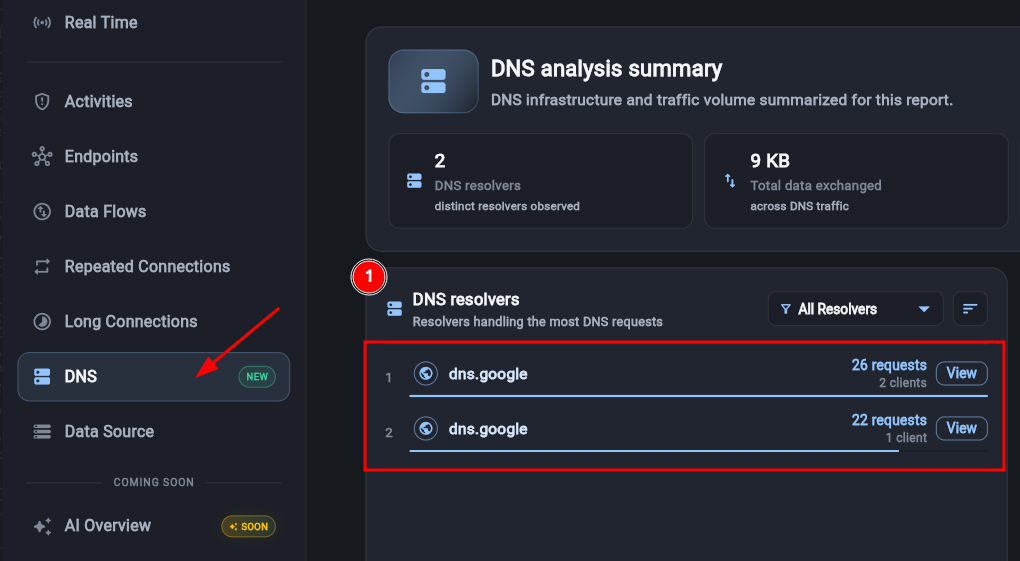
The first and most obvious sign of something that slipped beyond your control is the use of unexpected/unapproved resolvers. Remember - a hacker with a foothold on an endpoint can theoretically direct DNS requests to resolvers that are not under your control and don't share logs with your SIEM. Listing all active resolvers will immediately surface the gap between "what you imagined" and "what the reality is". Unfamiliar or otherwise unapproved DNS resolvers are mostly the result of misconfiguration or lack of control rather than a hacker in the house, but it's a highly significant signal to act upon either way - maintaining control of the organizational DNS plane requires all resolvers to answer to you (send logs etc). We have recently added several DNS-specific views to our product to assist clients with investigating questionable behaviors, and a list of all active resolvers is the first step.
If a tree falls in a forest and no one is around to hear it, does it make a sound?
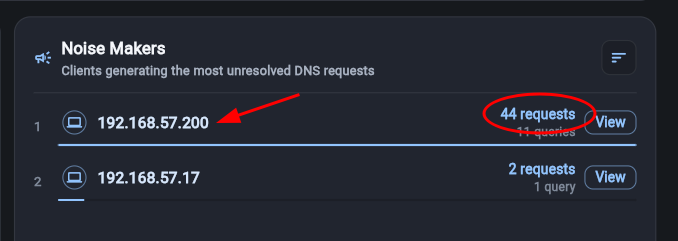
It has long become clear to me that every successful hack is always the result of many failed attempts. I believe many DFIR investigators share this notion and this is precisely why we take such attention in looking for clues and hints in (system and application) errors. Luckily, all popular apps - from web services such as apache, nginx and IIS to databases such as postgres, mysql, oracle db, mongodb, elastic and all the way to OS failed logon attempts, unexpected system reboots, service failures etc have their errors logged without required extra configuration and customization. Having said that, you may have already realized that DNS errors are not part of that basic error visibility. If a client tries to resolve some address and as a result either the DNS server responds with "I cannot resolve this" or "you are not allowed to resolve this" or even if he doesn't respond at all - there are really slim chances one would notice unless he has some sort of network monitoring in place. I remember performing such analysis at a client as part of a threat hunt that revealed millions of unresolved requests per second from >100 Linux servers trying to resolve their own hostnames with the local DNS. Such configuration error could have a grave effect on network performance and system resources. Here's how you can inspect all forms of DNS errors (aka DNS "noise").
Light at the end of the DNS tunnel
I kept the best DNS detection here for the end. DNS tunnel is the common term for a data transport hackers establish over legitimate DNS traffic - or, at least, as I will now explain - legitimate as far as the firewall and the local DNS forwarder are concerned, but in no way legitimate if someone would bother to inspect the actual payload. Let's take a step back first to establish the mechanics - as they are essentials for the detection. What are the prerequisites? Pwning the trusted DNS resolver? No. Does it involve sending non DNS traffic over DNS-like udp transport (port 53)? No. It is real DNS traffic. It can traverse through your trusted local DNS resolver. It requires the attacker to buy a domain and run the authoritative resolver for that zone. So how does data get transferred through DNS? The attacker must already have hold of a victim client host. This client will then send DNS requests for hosts (or other records) within the domain he purchased.
Say the domain the hacker just bought is rnicrosoft.com (I find this one to be really funny, if you don't get it - nvm, it's just an example), the custom DNS client could send a DNS request to resolve 'nbswy3dp.rnicrosoft.com'. As the local, approved DNS does not hold the answer for this host - it will forward it and so will other servers until it reaches the authoritative DNS server for rnicrosoft.com, which is owned by the hacker. 'nbswy3dp' decodes to 'hello' in base32 encoding - thus the client just found a way to send data from within the organization to a hacker-controlled machine while traversing both the local DNS resolver and the network firewall. To maximize the bandwidth (IP addresses in answer are either 32 bits or 128 bits of data) the hacker-owned resolver could send multiple answers and optional fields filled with data, but he could also (more commonly) choose query types that can naturally hold longer strings - the classic one being TXT records - holding 255 bytes per record, and holding as much as 4KB on UDP (and as much as 64KB on TCP) if multiple answers are chained. Other DNS record types like DNSKEY, RRSIG and CERT can also handle large data blocks.
In reality any type of DNS record would allow a bidirectional data path from the infected client to the hacker-owned host, providing a classic evasive channel for purposes such as C2, data exfiltration, upload of tools to the breached environment etc. The maximum length of a DNS hostname is 253 ASCII characters - which, if properly encoded, compressed (and encrypted) could provide a generous upload channel (~150 bytes of compressed data - could fit 300-600+ characters per request - which is hacker heaven). The first such widely documented tool that I am aware of was NSTX (Nameserver Transfer Protocol), released in 2000. The first tool that I actually got to witness was OzymanDNS, released in 2004. Since then, many such tools were developed, improved and shared - here's a short list of such tools you can play with to construct payloads of your own; dns2tcp, SoDNS, iodine, dnscat2, DNSTT etc. In recent years I just let students write their own tool as an assignment in hacking courses.
Anyway, once you become aware of these mechanics, it proves to be fairly straightforward to measure the data bandwidth between a host and a specific domain (what is often called eTLD+1), taking into account only unique requests while including all DNS query types. 'The data exchange in DNS requests' view does exactly that.
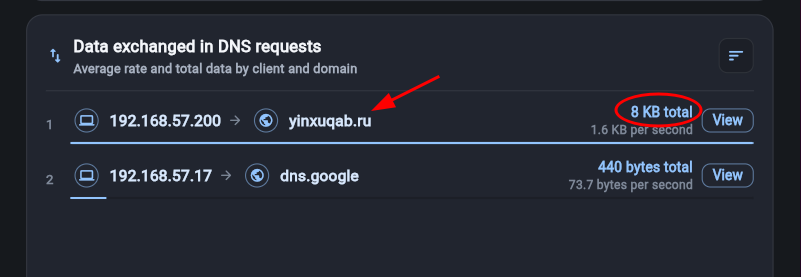
This immediately pops the 8KB that 192.168.57.200 exchanged with yinxuqab.ru (at 1.6KB/s). Click on the view button to see the detailed requests and responses - here everything looks incredibly suspicious; from the long host prefixes (key-1-6589e72db2602c7d7e8403b8.yinxuqab.ru), to the request frequency (precisely 10 requests/sec) to the relatively large number of requests. A typical client would make 1-2 requests per hour to the same domain, the time between requests would resemble human browsing speed and the prefixes are mostly 3-12 char readable words... you get the point.
Epilogue
Of course, this investigation should not end here. There are still many unresolved questions: How did this attack begin? (Hint: there's a phishing mail) Who did it target? How did the host get infected? What tools/scripts were downloaded? What passwords were revealed/used? Is there any sign of persistence? Can the data in the DNS tunnel be decoded? (in reality - sometimes, in this sample - yes!) Are there any signs of lateral movement? Are there any signs of data exfiltration? ... and of course, all the contacted domains deserve the usual treatment. Are they trusted? Has anyone in the organization contacted them prior to the incident? Were they recently registered? Was their ownership recently transferred? Do any of them resemble other trusted domains or companies (classic for phishing)? I won't rob you of the fun of answering these yourself. I hope you enjoyed this. Feel free to post comments, rants and remarks in our reddit community.
Put it into practice